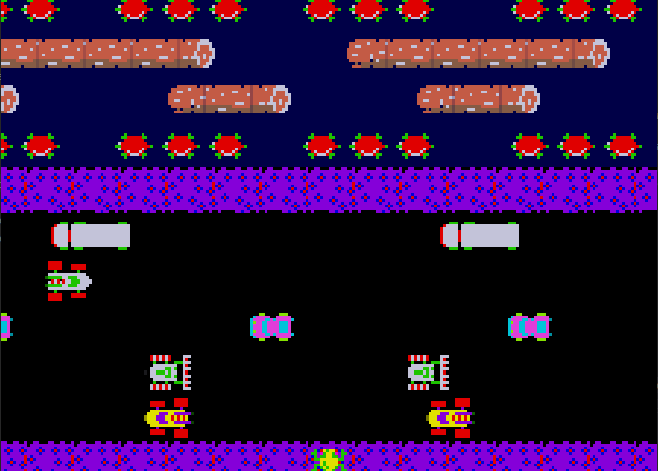
This is a Game Engine for 2D applications made using the Windows API from scratch. For this project I had to learn how to manage windows with the Win32 API, how to load and manage resources like images, text and sound files using Direct2D, DWrite and XAudio2.
The Windows Message Queue
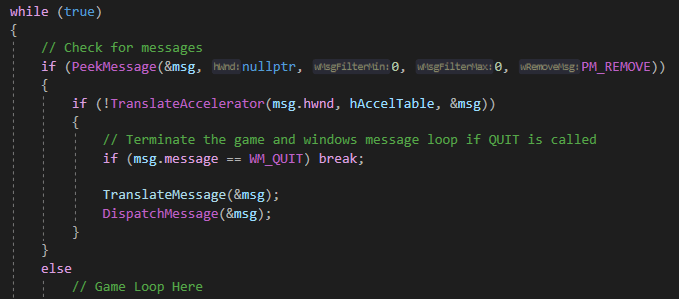
The windows messaging queue allows us to receive and process the input of the player.
At the start of the game loop we process all messages that the user may have sent. depending on which message it is we handle it accordingly. (see image above)
Every time a person either uses his mouse, moves the window, presses a key, closes the window, etc., a specialized message is sent to the engine. This message contains the id of the message and other extra information depending on the type of message.
the id of the message needs to be processed using either a switch case or a hash map, either is fine because sending a message is rare compared to other processes that the engine will do.
The extra information that a message can contain depends on the id. when a keyboard button is pressed it will provide the keycode for that specific key, allowing us to process that key using the engine.
When the mouse is moved it will include a 2 dimensional vector which contains the cursor location on the screen.
There are a bunch more messages but these are some of the most important if you’re making an Engine.

Direct2D
For this Engine I used Direct2D as a rendering backend. It is an extension of the DirectX API and is included in standard windows.
It specializes in Drawing 2D shapes and images onto the screen without having to setup a 2D environment using a 3D backend.
Using Direct2D you are able to draw lines, Rectangles, Rounded Rectangles, Ellipses, Circles, Polygons, Bezier curves and Bitmaps (images).
Direct Write
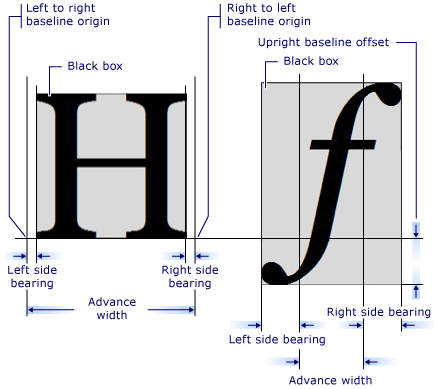
To display text to the screen I used the Direct Write (DWrite) API that is also standard on windows computer.
It allows you to generate font data at runtime, which allows you to draw text to the screen in any dimension or style.
XAudio2
XAudio2 is the latest Audio API from Microsoft that is included in windows.
In my engine I used the basic features that the API offers. Playing and looping sounds.
I was able to produce Sound effect with just a function call and even loop specific parts of the sound file for as many times as the user saw fit.
Component System
Most Engines use a component system, and for good reason. It allows the programmer to easily add existent pieces of code and simplify the base Objects by offloading many function to specialized components.
Every game object has a list of components that can be added and removed at any time. These component are in charge of very basic things and may only have a unique purpose.
Some examples are: Collision component, Render component, Texture component, Audio component and much more.
Observer Pattern
The observer software design Pattern is an extremely powerful and useful software pattern.
It allows the programmer to notify pieces of code that an event occurred without having to know that they exist or what they’re going to do when the event gets called.
For example: When the player kills an enemy we various things to happen: The score should go up, the game should get notified that an enemy died, other players need to get that information, etc.
Instead of having the player class call every function of these different classes, which would make things very messy, we create a Subject to which Observers can connect to and receive data every time the subject wants to relay information.
Usually this pattern is implemented with inheritance like in Java. I however, decided to take rule 34 of the C++ coding standards to heart:
Prefer composition over inheritance
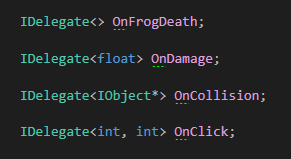
I made a variadic templated class that allows you to make an observer object, which I call a Delegate (inspired by UE4), this object can be placed anywhere. In the example I placed it inside the player class.
Because of the Variadic Template I’m able to create an observer that takes any amount and type of parameter for the function calls.
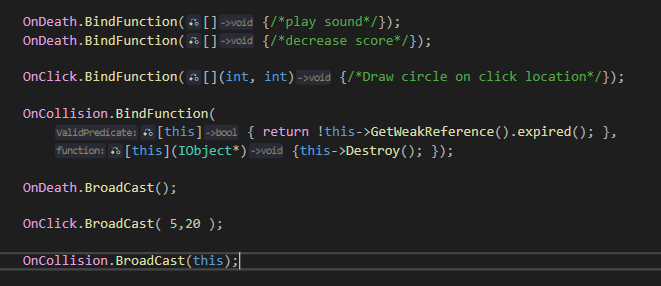
In this example you can see how it works in action. Any class or object that can get a reference to the Delegate instance may bind a function to it.
That function may later be called whenever the Subject feels necessary.
There is however a big issue with this implementation, you can bind member functions that may get invalidated when the instance is deleted.
That is why I added the option to also give a predicate that tells the delegate when the function it should call isn’t valid anymore.
This Pattern proved so useful that I used it everywhere inside of my code, especially inside of my Input manager.
Input Manager
The input manager is a Singleton that is in charge of processing the users inputs it receives from the windows message queue and translating that to the game.
Anything is able to bind a function to the input manager and a specified key/button. Whenever that key or button is pressed or activated. The input manager will call the bound function.
I used the Delegates for this, as it already provides all the logic for binding functions and checking validity of those functions.
I also added KeyDown , KeyUp and KeyPressed events. The programmer can choose when the event gets fired: the moment the key/button is pressed, when it is is let go, or every frame it is held down.
The input manager is also responsible for the mouse location and calling events whenever a mouse button is clicked.
Resource Manager
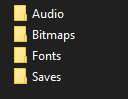
Every engine of course need a way to load Files and translate them into usable resources for the game.
The resource manager I created is able to load any image using the WIC image decoder that Microsoft provides. It is also able to load sound and font files so that they may be used in game.
It will also detect when a resource is still inside the game using shared and weak pointers. whenever a you try to load a resource that is already loaded inside of the game it will skip the loading process and return a reference to the in game resource.
Checking Overlapping objects
For my Engine I also tried to figure out how to detect when different game objects overlap with each other.
I created 3 different components:
A base collision component where the others inherit from
A Box Collision Component for objects that want to use a Box collision
A Circle Collision Component for objects that want to use a circle collision
These components are registered into a Manager that will generate Begin overlap and End overlap events whenever two component start to overlap. It also has the ability to return a list of all components that are currently overlapping with a specific object
Examples
Frogger
Nonogram/Picross Solver
This is a Nonogram solver that was made using my 2D engine. It was made for a research topic at DAE. Currently there are only 2 solving algorithms but it is very scalable.
If you are interested in reading more about it you can follow the link to the GitHub repository: github.com/ConnorDeMeyer/Visual-Nonogram-Solver
 Connor De Meyer | Portfolio
Leave a comment